
What can you do with AWS?
You can run all sorts of application on AWS by using one or a combination of services. The examples in this section will give you an idea of what’s possible
👨💻Running a Java EE application in your private network
-
Paul is a senior system architect in a global corporation. He wants to move parts of his company’s business applications to AWS when the data-center contract expires in a few months, to reduce costs and gain flexibility.
-
He wants to run enterprise applications (such as Java EE applications) consisting of an application server and an SQL database on AWS.
-
To do so, he defines a virtual network in the cloud and connects it to the corporate network through a Virtual Private Network (VPN) connection.
He installs application servers on virtual machines to run the Java EE application.
Paul also wants to store data in an SQL database service (such as Oracle Database Enterprise Edition or Microsoft SQL Server EE).
-
For security, Paul uses subnets to separate systems with different security levels from each other.
By using access-control lists, he can control ingoing and outgoing traffic for each subnet. For example, the database is only accessible from the JEE server’s subnet which helps to protect mission-critical data.
Paul controls traffic to the internet by using Network Address Translation (NAT) and firewall rules as well.
The image illustrates what architecture may look like
-
Paul has managed to connect the local data center with a private network running remotely on AWS to enable clients to access the JEE server.
To get started, Paul uses a VPN connection between the local data center and AWS, but he is already thinking about setting up a dedicated network connection to reduce network costs and increase network throughput in the future.
-
The project was a great success for Paul.
He was able to reduce the time needed to set up an enterprise application from months to hours, as AWS can take care of the virtual machines, databases, and even the networking infrastructure on demand within a few minutes.
Paul’s project also benefits from lower infrastructure costs on AWS, compared to using their own infrastructure on-premises.


✔Implementing high availability
-
Ringo is a software engineer working for a fast-growing start-up.
Ringo knows that Murphy’s law applies to IT infrastrucutre: anything that can go wrong, will go wrong.
-
Ringo is working hard to build a highly available system to prevent outages from ruining the business.
All services on AWS are either highly available or can be used in a highly available way.
-
So, Ringo builds a system like the one shown.
A high availability architecture.
-
The database service is offered with replication and fail-over handling.
In case the master database instance fails, the standby database is promoted as the new master database automatically.
-
Ringo uses virtual machines acting as web servers.
These virtual machines aren’t highly available by default, but Ringo launches multiple virtual machines in different data centers to achieve high availability.
A load balancer checks the health of the web servers and forwards requests to healthy machines.
-
So far, Ringo has protected the startup from major outages.
Nevertheless, him and the band are always planning for failure and are constantly improving the resilience of their systems.
If one of these virtual machines fails, the load balancer will send customer requests to the other virtual machines.
This setup improves the web shop’s reliability.
🤑Profiting from low costs in batch processing infrastructure
-
George is a data scientist who needs to process massive amounts of measurement data collected from something sciencey - like gas turbines.
-
He needs to generate a report containing the maintenance condition of hundreds of turbines daily.
Therefore, his team needs a computing infrastructure to analyse the newly arrived data once a day.
-
Batch jobs are run on a schedule and store aggregated results in a database.
A business intelligence (BI) tool is used to generate reports based on the data stored in the database.
-
As the budget for computing infrastructure is very small, George and his team have been looking for a cost effective solution to analyze their data.
He finds a way to make clever use of AWS’s price model:
-
So George launches a virtual machine when starting a batch job, and terminates it immediately after the job finished.
Doing so allows him to pay for computing infrastructure only when actually using it.
This is a big game changer compared to the traditional data centre where George had to pay a monthly fee for each machine, no matter how much it was used.
-
The project was a great success for George.
AWS offers spare capacity in their data centres at substantial discount. It is not important for George to run a batch job at a specific time.
He can wait to execute a batch job until there is enough spare capacity available, so AWS offers him a virtual machine with a discount of 50%.
Potentially up to 90% with spot discounts. George is happy to have access to a computing infrastructure that allows his team to analyse data at low costs.

🛒Hosting a web shop
-
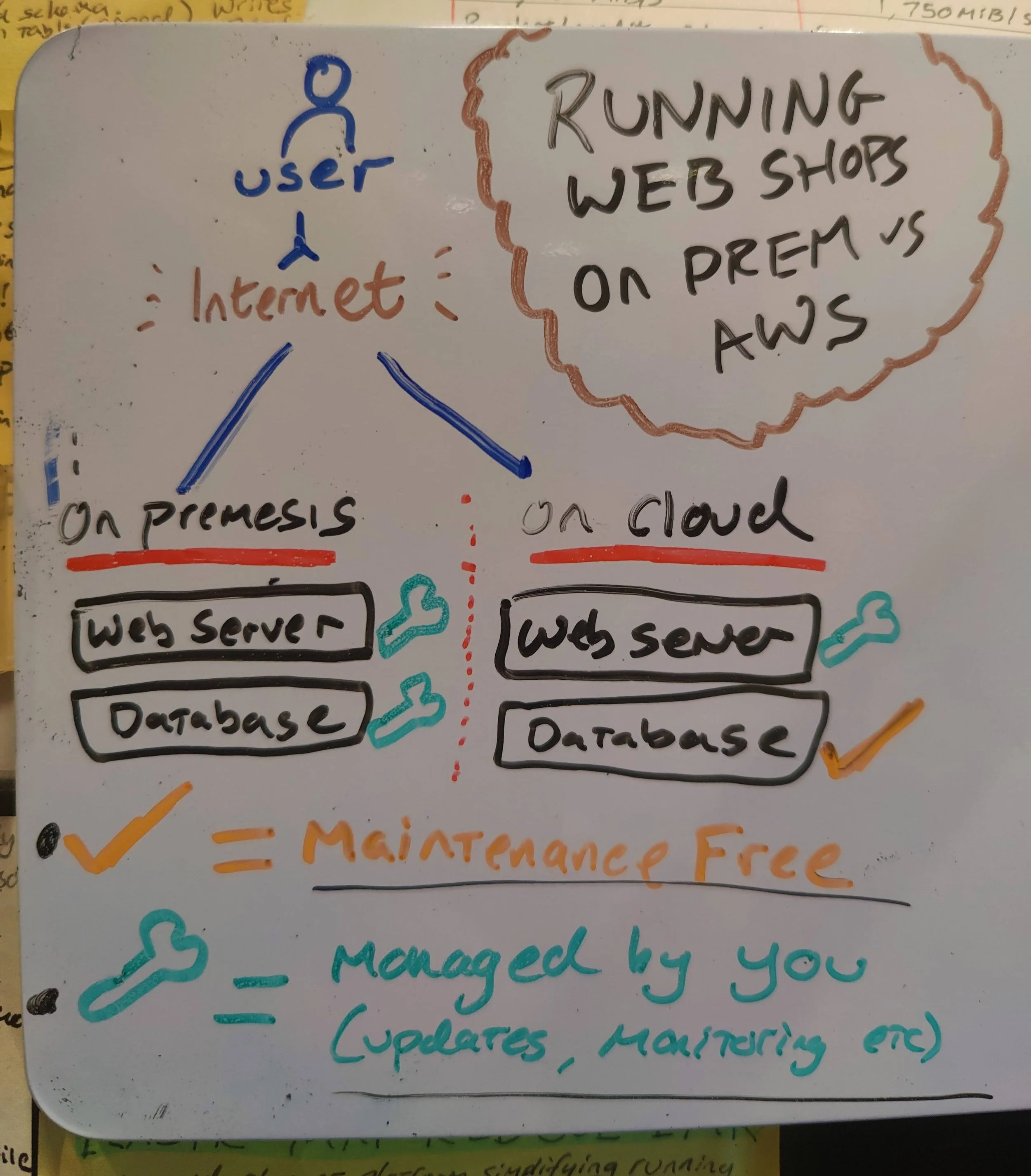
John is CIO of a medium-sized online commerce site. He wants to develop a fast and reliable web shop.
He initially decided to host the web shop on-premises, and three years ago he rented machines in a data center. A web server handles requests from customers, and a database stores product information and orders.
-
John is evaluating how his company can take advantage of AWS by running the same setup on AWS
-
John not only wants to lift-and-shift his current on-premises infrastructure to AWS; he wants to get the most out of the advantages the cloud is offering.
The offerings in ML, AI, and other enterprise offerings are quite attractive too!
-
The web shop consists of dynamic content (such as products and their prices)
As well as static content (such as the company logo).
Splitting these up would reduce the load on the web servers and improve performance by delivering the static content over a content delivery network (CDN ).
-
Switching to maintenance-free services including a database, an object store, and a DNS system would free John from having to manage these parts of the system.
Decreasing operational costs and improving quality.
-
The application running the web shop can be installed on virtual machines.
Using AWS, John can run the same amount of resources he was using on his on-premises machine, but split into multiple smaller virtual machines at no extra cost.
If one of these virtual machines fails, the load balancer will send customer requests to the other virtual machines.
This setup improves the web shop’s reliability.

◀With something similar to this, John would be happy with running his web shop on AWS.
By migrating his company’s infrastructure to the cloud, he was able to increase the reliability and performance of his web shop.
These are just a few simple examples of what’s possible on AWS.
If you can think of it, you can do it!